
YouTube Vanced APK Ad-Free YouTube Experience on Android
Enjoy a Premium, Ad-Free Experience with Advanced Playback Features Including Complete Ad Blocking, Seamless Background Playback, Picture-in-Picture Mode, Smart SponsorBlock Integration, Automatic Video Looping, Secure Google Account Login Support, Offline-Ready APK Access, and Safe Manual Download Options.
What Is YouTube Vanced Mod APK?
YT Vanced is a modified YouTube app that offered an enhanced video streaming experience for Android devices. This third-party modified YouTube client provided features like ad-free video streaming, background playback, and advanced customization options that weren’t available in the official YouTube app.
Important Notice: YouTube Vanced was officially discontinued in March 2022 following a request from Google. The development team ceased all updates and removed download links from their official channels. While existing installations continue to function, no new updates or official support are available.
Despite being a discontinued project, YouTube Vanced remains one of the most sought-after modified YouTube apps due to its comprehensive feature set. Users who installed it before discontinuation can still use the app on their Android devices, though compatibility with newer Android versions may vary.
YouTube Vanced Version Information
| App Name | Latest Stable Version | Package Name | Android Requirement | Architecture | Last Update | App Size |
| YouTube Vanced | 17.03.38 | com.vanced.android.youtube | Android 5.0+ | ARM/ARM64/x86 | March 2022 | 70-85 MB |
| Vanced MicroG | 0.2.24.220220 | com.mgoogle.android.gms | Android 4.4+ | Universal | March 2022 | 8-10 MB |
| Vanced Manager | 2.6.2 | com.vanced.manager | Android 5.0+ | Universal | March 2022 | 15 MB |
Download YouTube Vanced APK for Android
Safety Disclaimer: YouTube Vanced is not affiliated with, endorsed by, or connected to Google LLC or YouTube. This is an independent third-party modification. Users should understand the risks associated with installing apps from sources outside the Google Play Store.
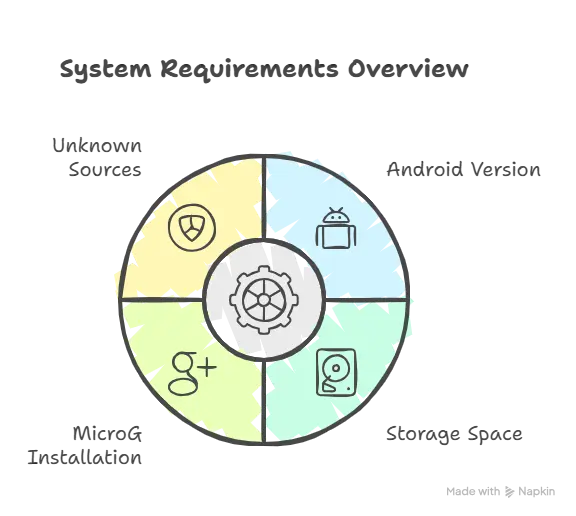
Before downloading YouTube Vanced APK, ensure your device meets these requirements:
- Android 5.0 (Lollipop) or higher for optimal performance
- Minimum 100 MB free storage space
- MicroG installed for Google account sign-in functionality
- Unknown sources enabled in device security settings
Required Components
MicroG is a lightweight, open-source implementation of Google Play Services required for YouTube Vanced to function properly. It enables Google account sign-in, synchronization, and notification features without requiring the full Google Play Services framework. Installing MicroG before YouTube Vanced ensures seamless authentication and prevents sign-in errors.
YouTube Vanced Features Explained
In-Built Ad Blocker
YouTube Vanced includes a powerful ad-blocking system that removes all types of YouTube advertisements without requiring root access or additional browser extensions. The built-in ad blocker eliminates pre-roll ads that play before videos start, mid-roll ads that interrupt content during playback, and banner ads that appear throughout the interface. This creates an uninterrupted viewing experience similar to YouTube Premium but without the subscription cost.
Background Play for Videos & Music
Background playback allows you to continue listening to YouTube videos and music even when your screen is off or while using other apps. This feature is particularly valuable for music listeners, podcast enthusiasts, and educational content consumers who want audio-only playback without keeping their screen active. The background play function works seamlessly with Android’s media controls, allowing you to control playback from your notification shade or lock screen.
Picture-in-Picture (PiP) Mode
Picture-in-picture mode enables you to watch YouTube videos in a floating, resizable window while using other apps on your device. You can minimize the video player to a small overlay that stays on top of other applications, making multitasking effortless. The PiP window can be moved anywhere on your screen and resized according to your preference, perfect for following tutorials while taking notes or watching content while browsing.
True AMOLED Dark Mode (Battery & Eye Protection)
YouTube Vanced features a pure black AMOLED dark mode specifically designed for devices with OLED and AMOLED screens. Unlike the standard dark gray theme in official YouTube, this true black theme turns off individual pixels completely, significantly reducing battery consumption on OLED displays. The AMOLED dark mode also reduces eye strain during nighttime viewing and provides better contrast for improved readability in low-light conditions.
Skip In-Video Sponsored Content Automatically
One of YouTube Vanced’s most popular features is SponsorBlock integration, which automatically skips sponsored segments within videos. This community-powered system identifies and bypasses promotional content embedded by creators, saving you time and creating a more streamlined viewing experience.
No Root Required (Works on Non-Rooted Devices)
YouTube Vanced operates on standard Android devices without requiring root access or system modifications. This makes installation straightforward and safe for average users who want enhanced YouTube features without compromising device security or voiding warranties. The app installs as a separate application alongside the official YouTube app, maintaining complete system integrity.
Advanced Vanced Settings
The Vanced settings menu provides extensive customization options not available in the official YouTube app. Users can modify interface elements, adjust playback behaviors, configure ad-blocking preferences, and personalize their viewing experience down to granular details. These settings include theme customization, gesture control sensitivity, video quality preferences, codec selection, and interface layout modifications.
HDR Playback Support
YouTube Vanced supports High Dynamic Range (HDR) video playback on compatible devices, delivering enhanced color depth, improved contrast ratios, and superior visual quality. HDR support includes HDR10 and HDR10+ formats, providing a premium viewing experience for supported content without requiring YouTube Premium subscription.
Parallel App Usage
YouTube Vanced uses a different package name than the official YouTube app, allowing both applications to coexist on the same device. This parallel installation capability means you can maintain the official YouTube app for features like YouTube Shorts creation or live streaming while using Vanced for everyday video consumption. Both apps function independently with separate settings, accounts, and data storage.
Offline Video Saving
Important Clarification: YouTube Vanced does not include official offline download functionality similar to YouTube Premium. While some modified versions claim offline saving capabilities, this feature violates YouTube’s Terms of Service and may not function reliably. Users seeking legitimate offline video access should consider YouTube Premium or other authorized solutions.
Anti-Ban Protection
YouTube Vanced includes measures designed to reduce detection as a modified client, but no anti-ban system provides absolute protection. While millions of users have used Vanced without account issues, Google theoretically could detect and restrict accounts using modified apps. The risk remains relatively low based on historical data, but users should understand that using third-party YouTube clients always carries some potential account security implications.
Sign in With Your Own Google Account
MicroG enables full Google account authentication within YouTube Vanced, allowing you to access subscriptions, playlists, watch history, and personalized recommendations. The sign-in process mirrors the official YouTube experience, maintaining synchronization across devices and preserving your YouTube account preferences. MicroG operates independently from Google Play Services, providing authentication without system-level integration.
Gesture Controls for Playback
YouTube Vanced includes intuitive gesture-based controls for video playback management. Double-tap the left side of the video player to rewind, or double-tap the right side to fast-forward, with customizable skip intervals. These gesture controls make navigation through longer videos more efficient and provide a modern, smartphone-optimized viewing experience.
Swipe Controls for Brightness & Volume
Swipe-based controls allow quick brightness and volume adjustments without leaving the video player. Swipe up or down on the left side of the screen to control brightness, while swiping on the right side adjusts volume levels. These intuitive controls eliminate the need to access system settings or notification panel, keeping you immersed in your content.
See the Like-Dislike Counter
YouTube Vanced restores the public dislike counter that YouTube officially removed in 2021. Through integration with the Return YouTube Dislike API, users can view both like and dislike counts on videos, providing valuable context for content quality assessment. This community-driven solution aggregates dislike data from participating users to estimate accurate dislike numbers.
Additional Advanced Features You Won’t Find in the Official App
Set Default Video Resolution for All Videos
YouTube Vanced allows you to set a preferred default video quality that applies automatically to all videos. Instead of manually selecting resolution for each video, you can configure the app to always play content at your preferred quality level, whether that’s 1080p for high-quality viewing or 480p for data conservation. This setting applies consistently across Wi-Fi and mobile data connections, with separate options for each network type.
Force Codec Playback (H.264 or VP9 for Older Devices)
Advanced users can force specific video codec usage to optimize playback performance on their devices. Selecting H.264 codec can improve compatibility and reduce buffering on older or less powerful Android devices, while VP9 codec offers better compression and quality on newer hardware. This codec selection capability helps users balance video quality with device capabilities and data usage.
Change Default Playback Speed System-Wide
YouTube Vanced includes persistent playback speed controls that remember your preferred speed across all videos. Unlike the official YouTube app that resets speed to normal after each video, Vanced maintains your chosen playback rate system-wide. This feature benefits users who consistently watch educational content, tutorials, or podcasts at accelerated speeds, eliminating repetitive speed adjustments.
Is YouTube Vanced Legal and Safe to Use? (Important Notice)
Legal Status Explanation
YouTube Vanced operates in a legal gray area. While modifying apps for personal use isn’t inherently illegal in most jurisdictions, YouTube Vanced violates YouTube’s Terms of Service by circumventing advertisements and implementing features reserved for paid subscribers. The app uses YouTube’s trademark and logo without authorization, which contributed to Google’s cease-and-desist request in March 2022.
Why Google Shut It Down
Google requested YouTube Vanced’s discontinuation because the modified app undermined YouTube’s revenue model by blocking advertisements and replicating YouTube Premium features without compensation to creators or the platform. The project’s growing popularity and mainstream attention likely prompted Google’s legal action. Following the request, the Vanced development team voluntarily shut down the project, removed all download links, and ceased development permanently.
Safety Risks of Unofficial Sources
Since YouTube Vanced is no longer officially distributed, users face significant security risks when downloading from third-party sources. Unofficial APK sites may bundle malware, spyware, or modified code that compromises device security and personal data. Without official updates, existing Vanced installations become increasingly vulnerable to security exploits and compatibility issues with newer Android versions.
How Users Can Protect Themselves
If choosing to use YouTube Vanced, download only from historically reputable APK archives with established track records. Verify APK signatures and checksums when possible, use mobile security software to scan downloaded files, and create separate Google accounts rather than using primary accounts. Consider modern alternatives like ReVanced, which offers similar functionality with active development and community support.
Common Issues & Fixes (Updated Solutions)
YouTube Vanced Buffering Issue Fixed (1:08 Problem Explained)
Many users experienced a specific buffering problem where videos freeze at exactly 1 minute and 8 seconds. This issue typically occurs due to codec incompatibility or outdated Vanced versions conflicting with YouTube’s server-side changes. To resolve the 1:08 buffering freeze, navigate to Vanced settings, locate video settings, and switch from VP9 codec to H.264 codec. Alternatively, clearing the app cache or reinstalling the latest compatible version often resolves persistent buffering problems.
App Not Working? Download the Latest Compatible Version
YouTube Vanced compatibility issues often stem from server-side updates that break older client versions. If experiencing crashes, sign-in failures, or functionality problems, ensure you’re using version 17.03.38, which remains the most stable and compatible release. Some users with Android 12 or newer may need to download specific architecture versions (ARM64, ARM, or x86) matching their device specifications for optimal performance.
How to Use YouTube Vanced APK on Android
Step 1: Enable Unknown Sources
Navigate to Settings > Security > Install Unknown Apps on your Android device. Locate your preferred browser or file manager and enable permission to install apps from that source. This security setting allows APK installation from outside the Google Play Store.
Step 2: Install MicroG
Download and install Vanced MicroG before installing YouTube Vanced. Open the downloaded MicroG APK file and follow the installation prompts. MicroG provides essential Google account authentication services required for sign-in functionality.
Step 3: Install Vanced APK
After MicroG installation completes, download the YouTube Vanced APK matching your device architecture. Open the APK file and proceed through the installation process. The app will install as “YouTube Vanced” to distinguish it from the official YouTube app.
Step 4: Sign In & Configure Settings
Launch YouTube Vanced and sign in using your Google account through MicroG authentication. Once signed in, access Vanced Settings from the profile menu to customize ad-blocking preferences, theme selection, playback defaults, and other advanced features according to your preferences.
Frequently Asked Questions
Conclusion – Should You Still Use YouTube Vanced in 2026?
YouTube Vanced remains a functional application for users who installed it before discontinuation, offering an ad-free YouTube experience with advanced features that official YouTube reserves for Premium subscribers. However, the discontinued status means no security updates, potential compatibility issues with newer Android versions, and risks associated with downloading from unofficial sources.
The feature legacy of YouTube Vanced significantly influenced the modified app ecosystem, demonstrating user demand for enhanced YouTube functionality. While Vanced itself no longer receives development, its impact continues through successor projects like ReVanced, which offers similar capabilities with active maintenance and community-driven development.
For users considering YouTube Vanced in 2026, weigh the benefits of ad-free viewing and background playback against security concerns and Terms of Service violations. Modern alternatives like ReVanced provide updated solutions with ongoing support, making them potentially safer choices for long-term use. Ultimately, YouTube Premium remains the only fully legal and supported method to access these enhanced features while compensating content creators.